> ## Documentation Index
> Fetch the complete documentation index at: https://docs.skylit.ai/llms.txt
> Use this file to discover all available pages before exploring further.
# Nexus field guide
> Practice options trades in your own $100,000 paper wallet, see exactly how each trade went, and compare your record with other traders.
Educational material, not financial advice. Nothing here is a recommendation to buy or sell any security. Options involve significant risk and are not suitable for every investor. Past behavior of any reading or setup does not guarantee future results.
**What this guide covers.** This guide covers the **NEXUS** section of the Skylit sidebar: Leaderboard, My Profile, Trades, Ideas, New Trade and Settings.
Why it matters
Most traders don't know their own numbers. Nexus shows you **how you actually trade, and how that compares with everyone else**, without risking real money.
It does four jobs for you:
* **A paper wallet for options.** You get one practice wallet that starts at \$100,000. Open paper positions in calls and puts from a live options chain, then add to, trim or close them. The wallet is yours for good and carries over from season to season. Seasons change the leaderboard, never your balance.
* **A record of every trade.** Each trade is kept as a card with its entries, trims, exit, profit or loss (P\&L) and how far it ran for or against you.
* **A community board.** The leaderboard ranks traders over the current season (an **Arc**), a week, a month or all time. There is also a board of Discord servers (**Guilds**). You can follow traders and see their trades in your feed and on your Atlas chart.
* **An ideas feed.** Post a short bullish or bearish view on a ticker. Nexus tracks the price from the moment you post it.
The first time you open Nexus, you accept a short disclaimer. Nexus is an educational beta for reviewing your own trading. It is not financial advice, and it is **not meant for copying anyone's positions**. Keep that in mind when you use the social features.
Where to find it
Open the left sidebar and scroll to **NEXUS**. It is there for every signed-in member.
| You want to | Go to |
| ----------------------------------- | -------------------------------------------------------------------------- |
| Place a paper options trade | Nexus > **New Trade** (or **New Trade** at the top of Trades) |
| Add to, trim or close an open trade | Nexus > **Trades** > **My Trades**, then open the card |
| See your wallet balance and return | Nexus > **My Profile**, wallet panel |
| See rankings, Arcs and guilds | Nexus > **Leaderboard** |
| Share your profile | Type `/nexus/u/` after the Skylit address and share that link |
| Post a trade idea | Nexus > **Ideas** |
| Post trades to Discord | Nexus > **Settings** > **Discord** and **Routing** |
| See your positions on a chart | Atlas > **Trade Deck** (on plans that include Atlas) |
Read it in 30 seconds
1. **Wallet first.** My Profile shows your paper equity, cash, realized P\&L and return, and how many practice trades are open.
2. **Open trades next.** Trades > My Trades > Active. Each card shows live P\&L, the best the trade has been (**Apex Return**) and the worst (**Max Drawdown**).
3. **Then your record.** The **Closed** tab on My Profile lists finished trades, and the stats radar sums them up: win rate, average return, worst loss.
4. **Then the board.** The Leaderboard opens on the current Arc. Your rank tier (Theta up to Oracle) shows only after **10 closed trades**. Until then you are Unranked, even if your row is on the board.
How to use it
Place a paper trade: New Trade
**Why it matters:** you can try a trade idea with realistic fills and see what it does to your wallet before you commit anything.
**Where:** Nexus > **New Trade**. It opens on the last symbol you charted, or TSLA if there isn't one. If you come from a futures chart (NQ, ES), it switches to the matching index ETF, because futures have no options chain here.
1. Check the ticker at the top. Type a new one to switch. Next to the price is the quote status: **Live** (streaming), **Snapshot** (the last quote is too old to count as live), **Closed** or **Waiting**.
2. Pick an expiration from the row of **expiration pills**.
3. Choose a contract. **Contract preference** picks a starting contract for you:
* **\~30Δ**: the contract with a delta closest to 0.30.
* **\$2-4**: a contract whose ask is between \$2 and \$4.
* **Liquid**: the one with the most open interest plus volume.
Tap any strike in the options chain to pick a different one.
4. Set the quantity. The order panel shows the estimated cost (price x quantity x 100). The **Simulated Buying Power** panel shows **Available Cash**, **Starting Bankroll**, **Realized P\&L** and **After This Order**, so you see what the trade does to your wallet first.
5. On a phone, add optional **Notes** (the box reads "Trade thesis..."): a note that stays with the trade.
6. Place the order with **Execute Trade** (desktop) or **Log as Simulated** (phone).
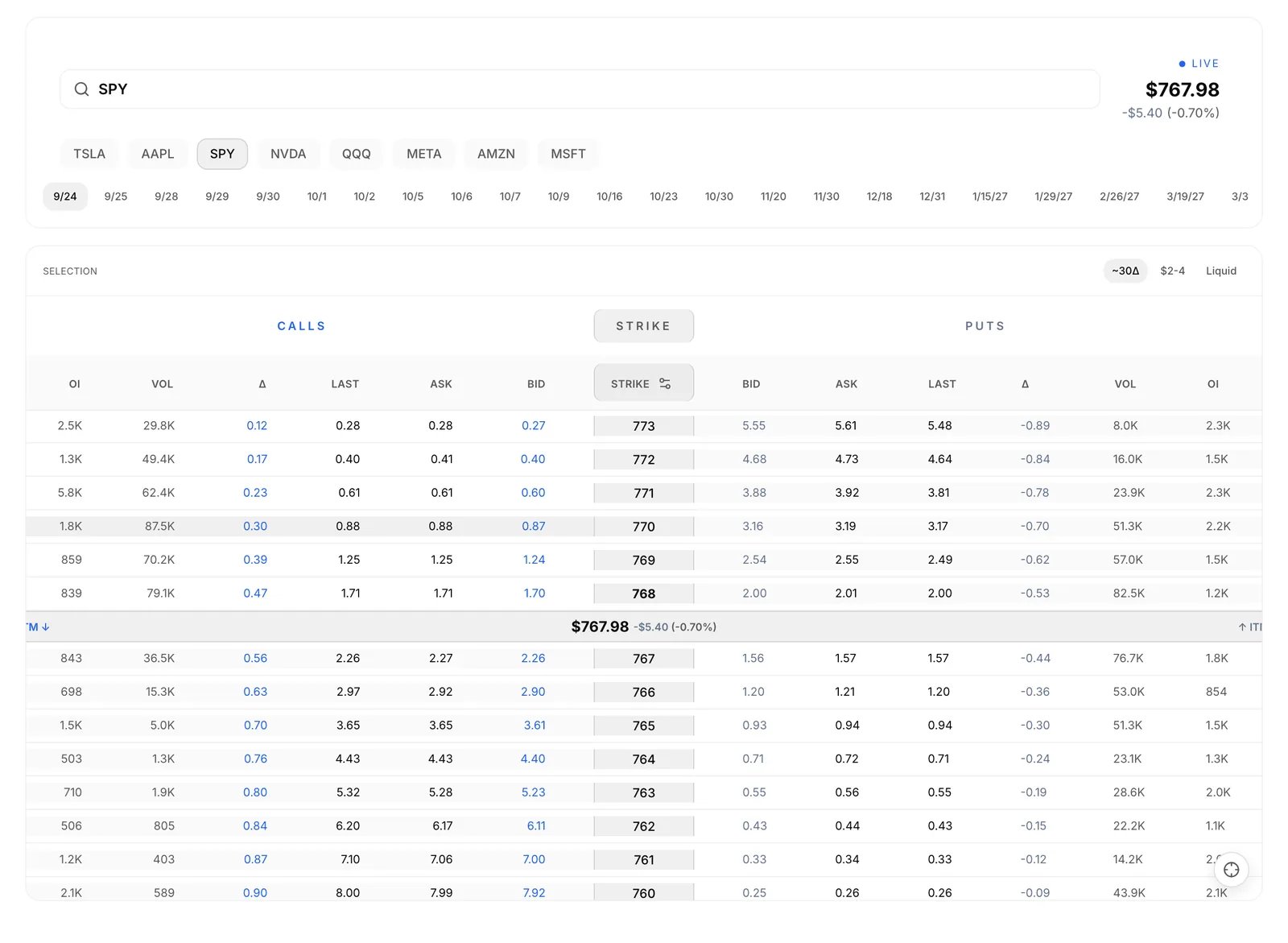
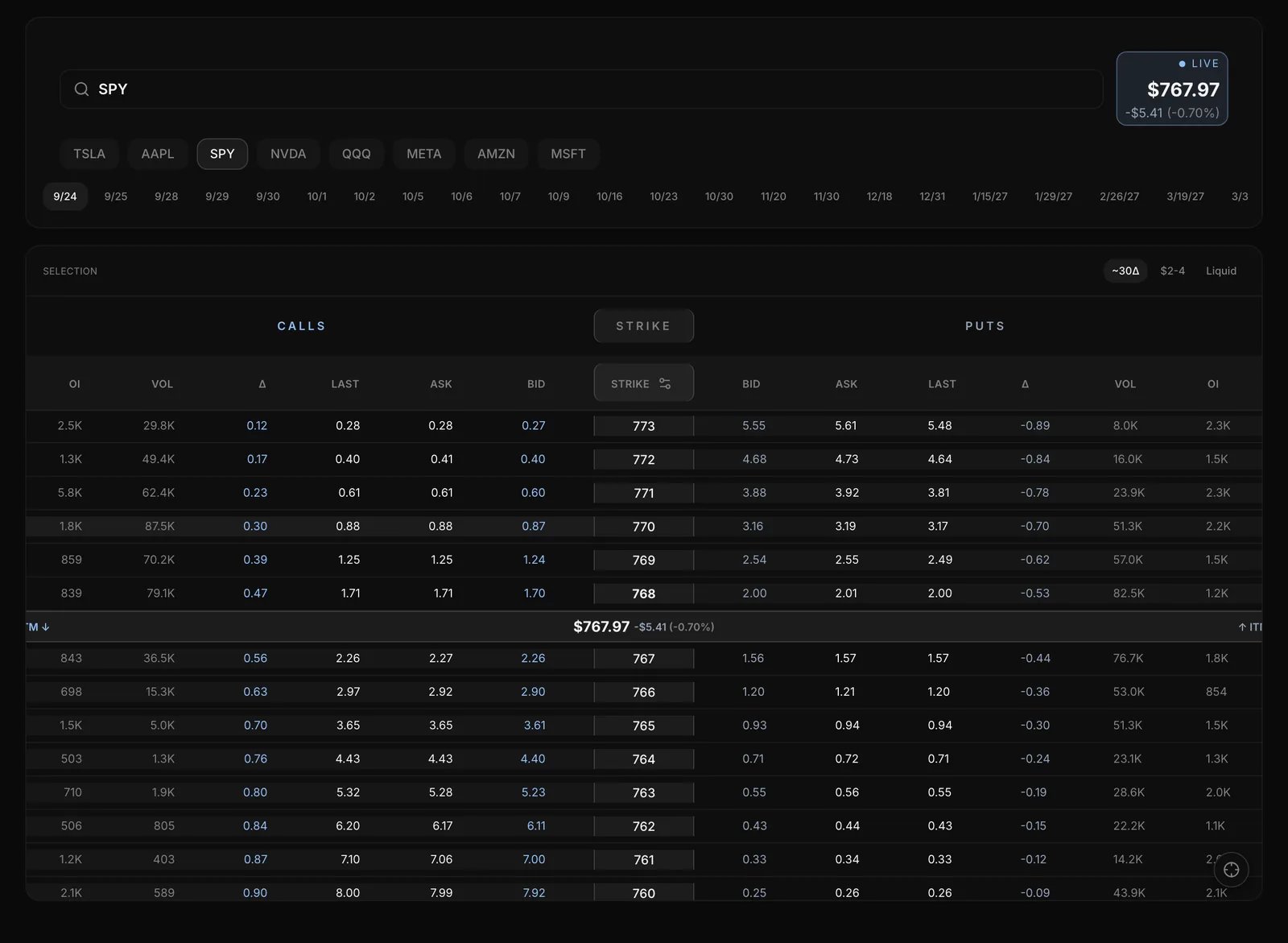 **In plain English.** Delta is roughly how much the option's price moves for a \$1 move in the stock. A 0.30-delta call gains about 30 cents a share (about \$30 a contract) if the stock rises \$1, before time decay and volatility change it. On the same expiration, lower-delta contracts sit further out of the money and cost less.
**Reading the chain.** Calls sit on the left, strikes in the middle and puts on the right, always side by side. Use the column picker to choose the columns (Bid, Ask, Last, Mid, Delta, Gamma, Theta, Vega, IV, Volume, Open Int). It also sets the **Strike Order**: **High → Low** or **Low → High**.
**How your order fills.** Orders are market orders. A buy fills at the **ask** and a sale at the **bid**, like a real market order.
**In plain English.** Every contract has two prices: the bid (the best price buyers are offering) and the ask (the best price sellers will take). Say a TSLA call is quoted 2.00 / 2.20. You pay \$220 for one contract, and if you closed it straight away you would get \$200 back. That \$20 is the spread, and you pay it before the stock has moved at all.
Orders go through only while that contract is trading. Outside those hours the button says why and when the market reopens. Expired contracts can't be traded.
**In plain English.** Delta is roughly how much the option's price moves for a \$1 move in the stock. A 0.30-delta call gains about 30 cents a share (about \$30 a contract) if the stock rises \$1, before time decay and volatility change it. On the same expiration, lower-delta contracts sit further out of the money and cost less.
**Reading the chain.** Calls sit on the left, strikes in the middle and puts on the right, always side by side. Use the column picker to choose the columns (Bid, Ask, Last, Mid, Delta, Gamma, Theta, Vega, IV, Volume, Open Int). It also sets the **Strike Order**: **High → Low** or **Low → High**.
**How your order fills.** Orders are market orders. A buy fills at the **ask** and a sale at the **bid**, like a real market order.
**In plain English.** Every contract has two prices: the bid (the best price buyers are offering) and the ask (the best price sellers will take). Say a TSLA call is quoted 2.00 / 2.20. You pay \$220 for one contract, and if you closed it straight away you would get \$200 back. That \$20 is the spread, and you pay it before the stock has moved at all.
Orders go through only while that contract is trading. Outside those hours the button says why and when the market reopens. Expired contracts can't be traded.
Manage your trades: Trades
**Why it matters:** the card shows you how a trade really played out, including the gain you left behind, so you can review exits as well as entries.
**Where:** Nexus > **Trades**. The tabs are **All**, **Following**, **My Trades** and **Bookmarked**.
To add to, trim or close one of your open trades:
1. Go to **My Trades** and set the filter to **Active**.
2. Open the trade card.
3. Tap **Add**, **Trim** or **Close**.
4. Set the quantity in the panel and confirm. Adds fill at the ask; trims and closes fill at the bid.
**Leave the price on market.** The panel shows the live Bid, Mark and Ask. Tapping one of them switches to a manual fill price, which isn't accepted. Leave it on the market price.
**Filters.** Choose **Verified Only** or **Simulated Only**, **Active** or **Closed**, and sort by **Newest**, **Oldest** or **Biggest Move**.
**Reading a trade card.** Each card shows the contract, a **Simulated** or **Verified** badge, the trader's rank tier and P\&L. Open it to see:
* the **timeline**: Opened Position, Averaged Down, Partial Exit and the exit, each with its price and time;
* live **Bid / Mark / Ask** and greeks for an open trade;
* the **excursion figures**. Open trades show Realized P/L, Apex Return, Max Drawdown and Trade Duration. Closed trades show Realized P/L, Absolute Apex, Missed Upside, Apex Giveback, Max Drawdown and Trade Duration;
* reactions, comments and a bookmark.
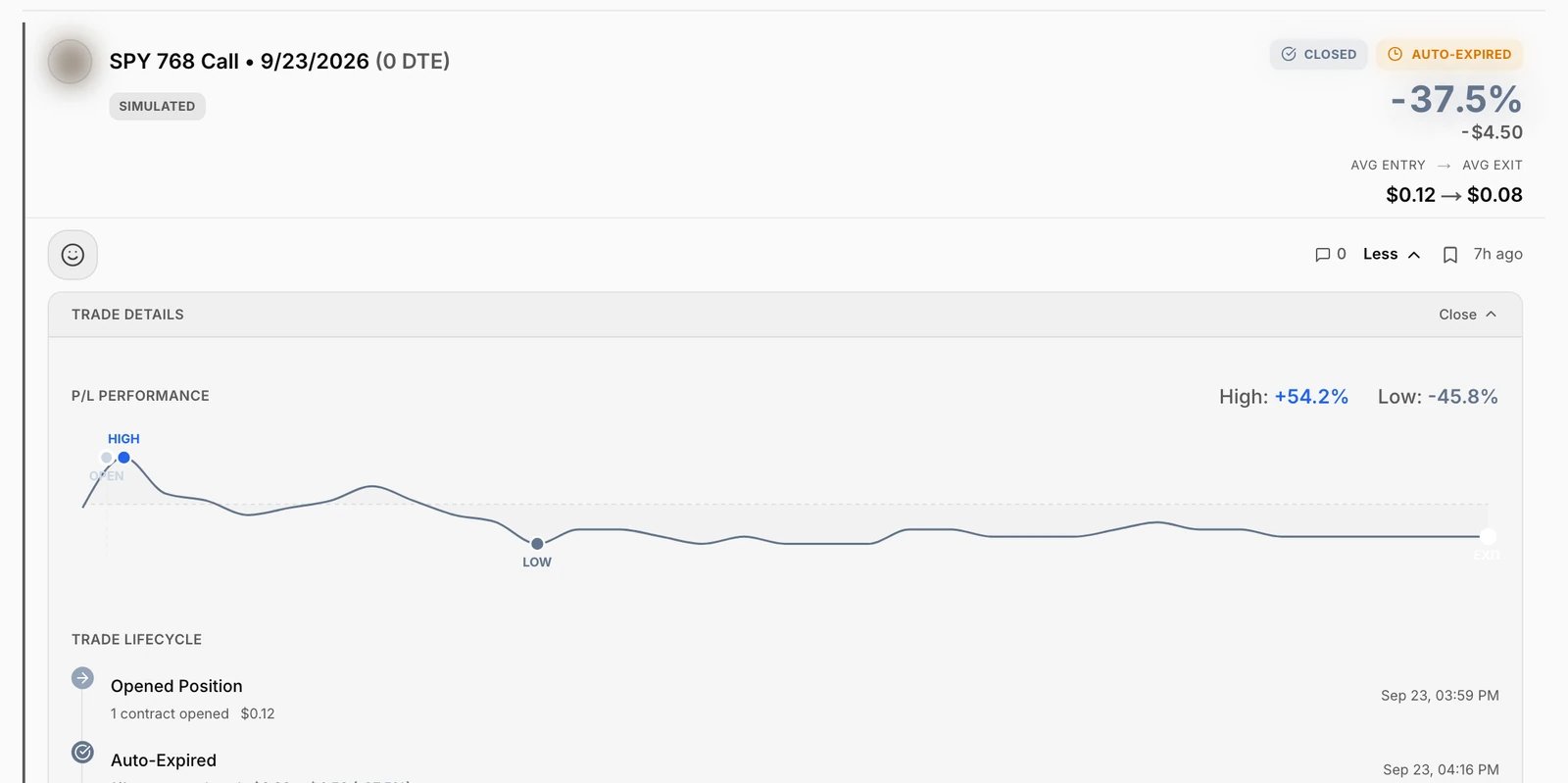
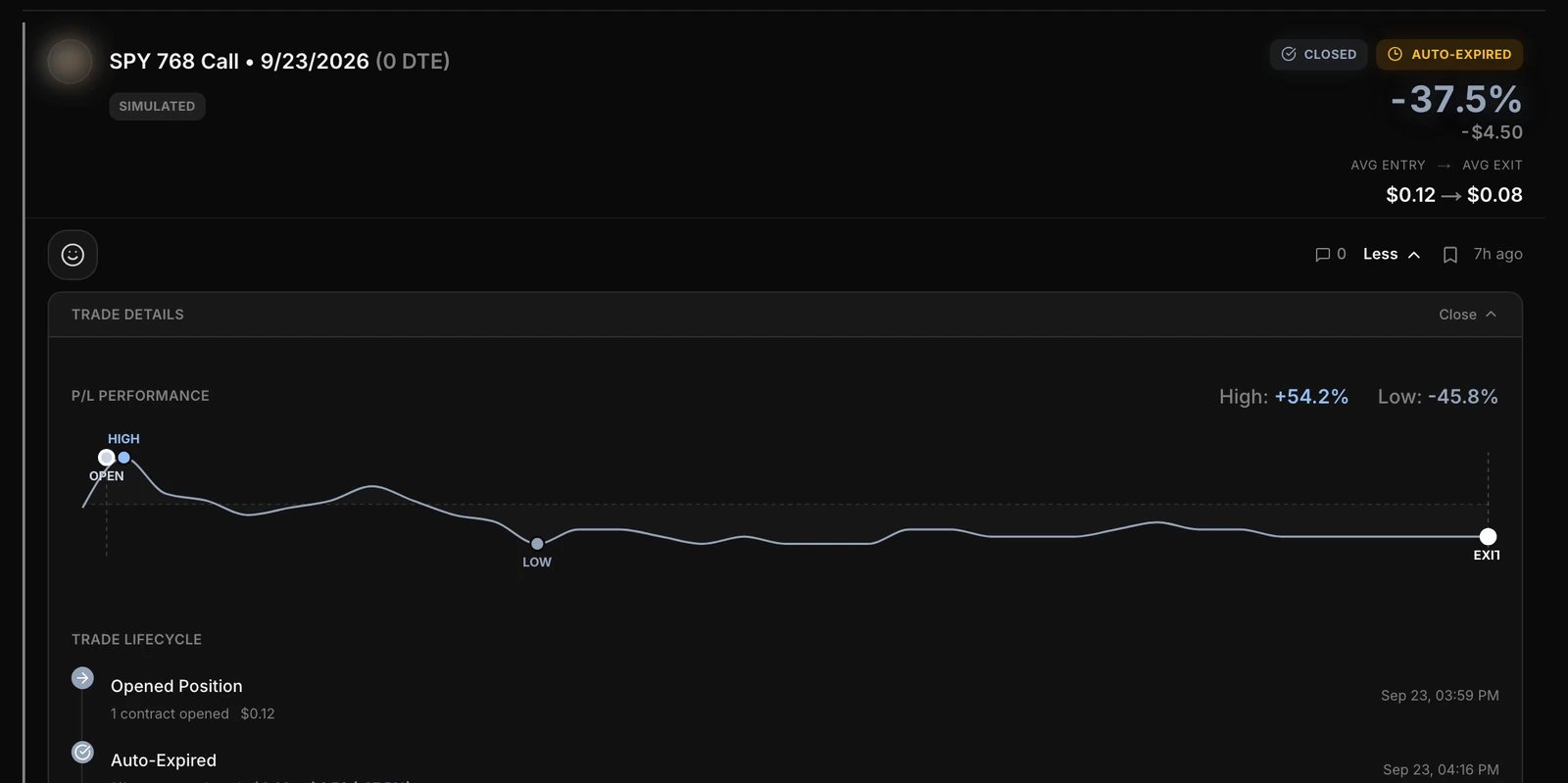 Contracts still open at expiration close by themselves and show as **Auto-Expired**.
**In plain English.** The excursion figures are a trade's high- and low-water marks. **Apex Return** is the best the trade got, **Max Drawdown** the worst. After you close, **Missed Upside** is how much further the contract ran without you. **Apex Giveback** is how much of the peak you handed back before you got out.
Contracts still open at expiration close by themselves and show as **Auto-Expired**.
**In plain English.** The excursion figures are a trade's high- and low-water marks. **Apex Return** is the best the trade got, **Max Drawdown** the worst. After you close, **Missed Upside** is how much further the contract ran without you. **Apex Giveback** is how much of the peak you handed back before you got out.
Your profile and wallet: My Profile
**Why it matters:** one page tells you where your practice account stands and what kind of trader your record says you are.
**Where:** Nexus > **My Profile**.
1. Read the **wallet panel**: Season Equity (cash plus the estimated value of open positions), Cash Balance, Realized P\&L, Season Return, the starting amount and **Resets This Season**.
2. Check the **stats radar**: Total Trades, Risk Reward, Worst Loss, Win Rate, Avg Return. A dash means *not measured yet*, not zero. Worst Loss is your single worst closing return, not an account drawdown.
3. Use the tabs: **Active**, **Closed**, and **Coach** (on your own profile only).
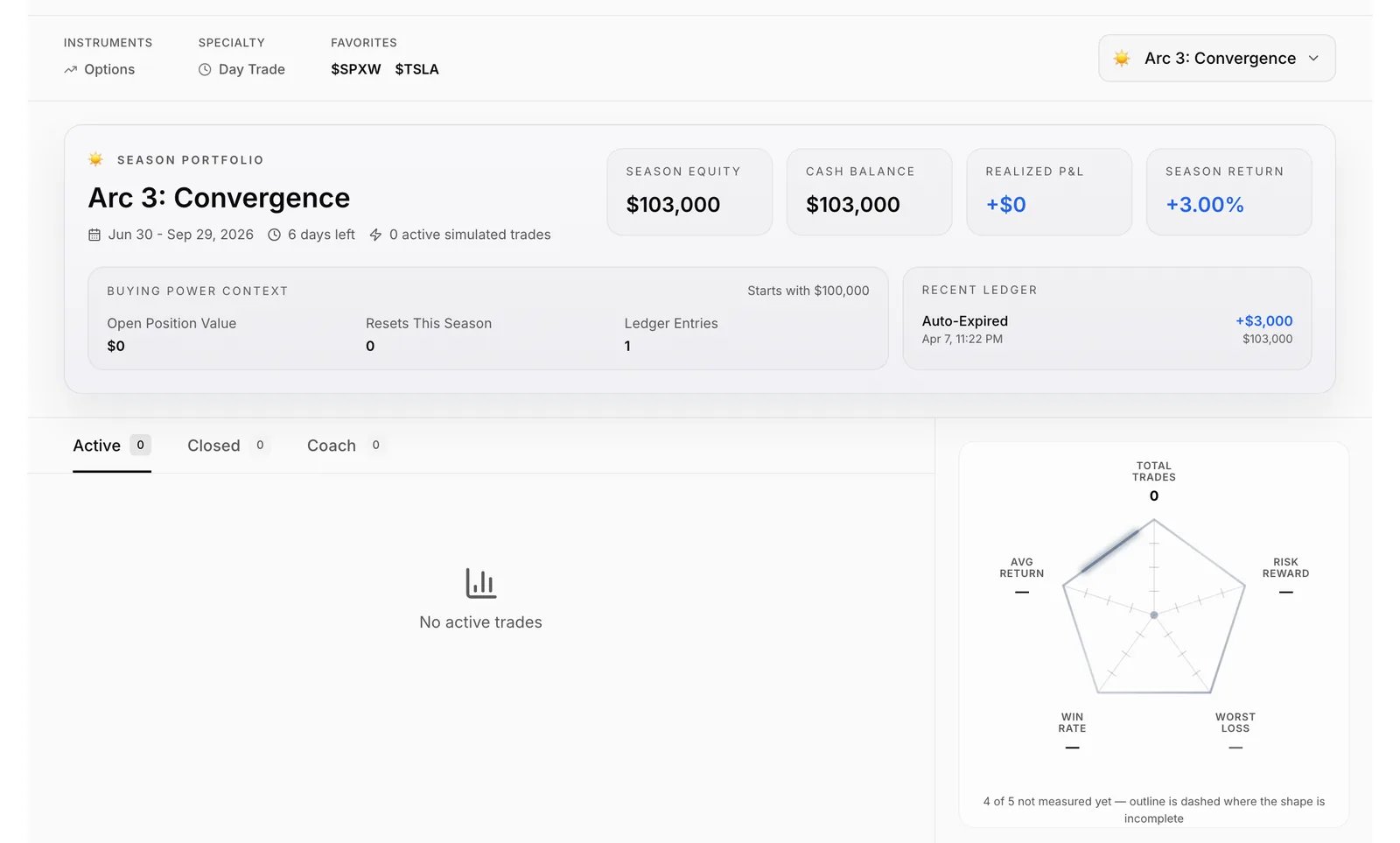
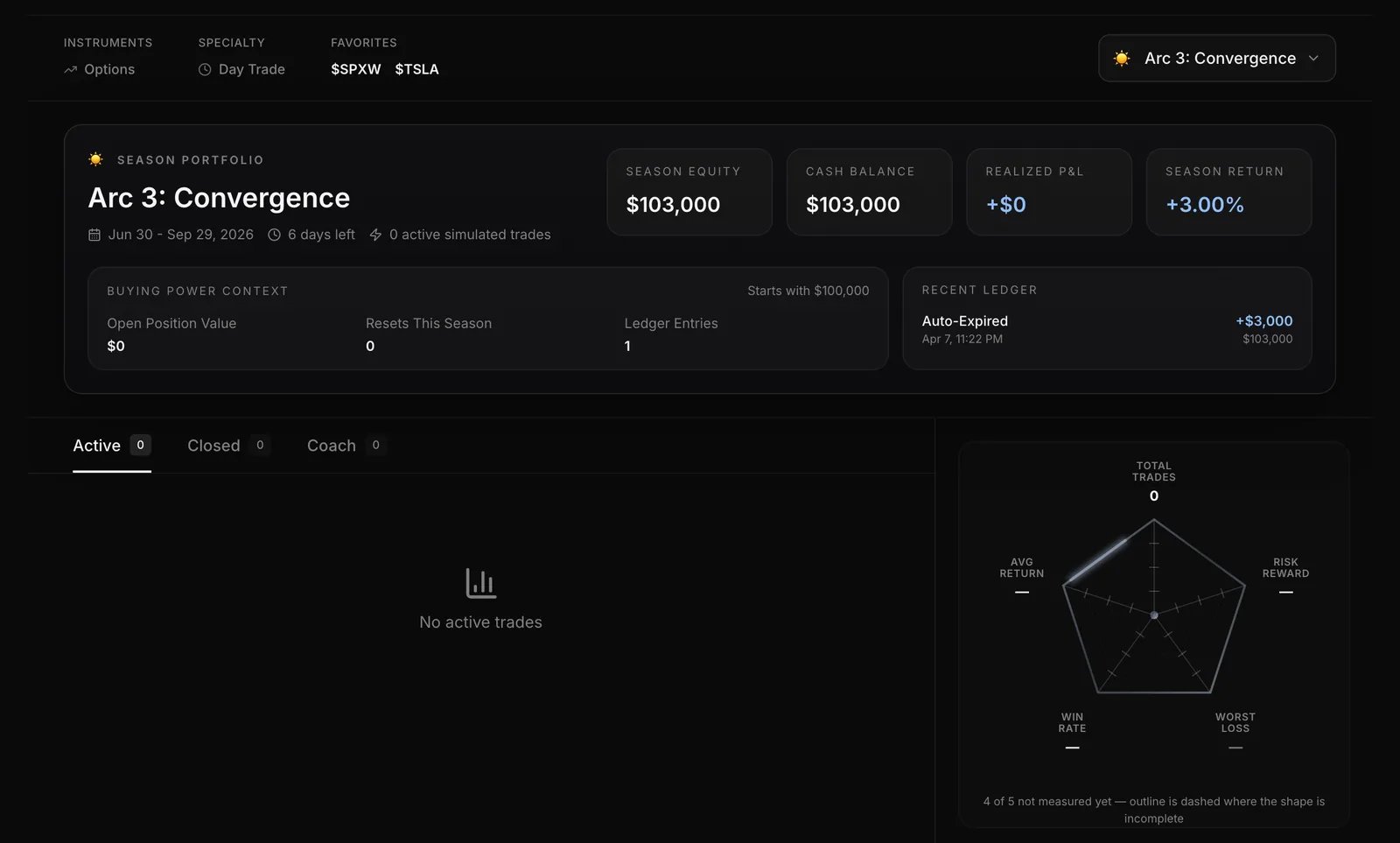 The top of the profile shows your **rank tier**, **Cred** (your Nexus reputation score), streak, followers and your primary guild.
**The Coach tab.** Coach reviews your own closed trades and points out habits, such as how long you hold, which expirations you favour and how far from the price you pick strikes.
* Until you have enough closed trades, it shows a progress bar: "You're at X / Y closed trades".
* After that it shows insight cards, refreshed overnight. Each has a label (Info, Opportunity, Warning or Critical) and a **Save** button.
**Your username.** If your account has no username, Nexus asks you to choose one: 3-20 letters, digits or underscores. Other people can't search for or follow an account with no handle.
**Sharing your profile.** Your profile has its own address, `/nexus/u/`, that you can paste anywhere. The Share icon in the profile header doesn't do anything yet, so copy the address by hand.
The top of the profile shows your **rank tier**, **Cred** (your Nexus reputation score), streak, followers and your primary guild.
**The Coach tab.** Coach reviews your own closed trades and points out habits, such as how long you hold, which expirations you favour and how far from the price you pick strikes.
* Until you have enough closed trades, it shows a progress bar: "You're at X / Y closed trades".
* After that it shows insight cards, refreshed overnight. Each has a label (Info, Opportunity, Warning or Critical) and a **Save** button.
**Your username.** If your account has no username, Nexus asks you to choose one: 3-20 letters, digits or underscores. Other people can't search for or follow an account with no handle.
**Sharing your profile.** Your profile has its own address, `/nexus/u/`, that you can paste anywhere. The Share icon in the profile header doesn't do anything yet, so copy the address by hand.
Rankings: Leaderboard
**Why it matters:** it shows how your record stacks up, and lets you study how other traders manage their trades.
**Where:** Nexus > **Leaderboard**.
1. Pick a board: **Individual** or **Guilds**.
2. Pick a timeframe: **Season** (the default), **Month**, **Week** or **All-Time**. In Season view the header shows the Arc's name and how many days are left.
3. Sort by clicking a column: Trader, Win Rate, Avg Return, Streak, Total Trades or Active.
4. Turn on **Verified** to keep only traders with broker-verified trades, or use **Search traders** to find anyone by handle.
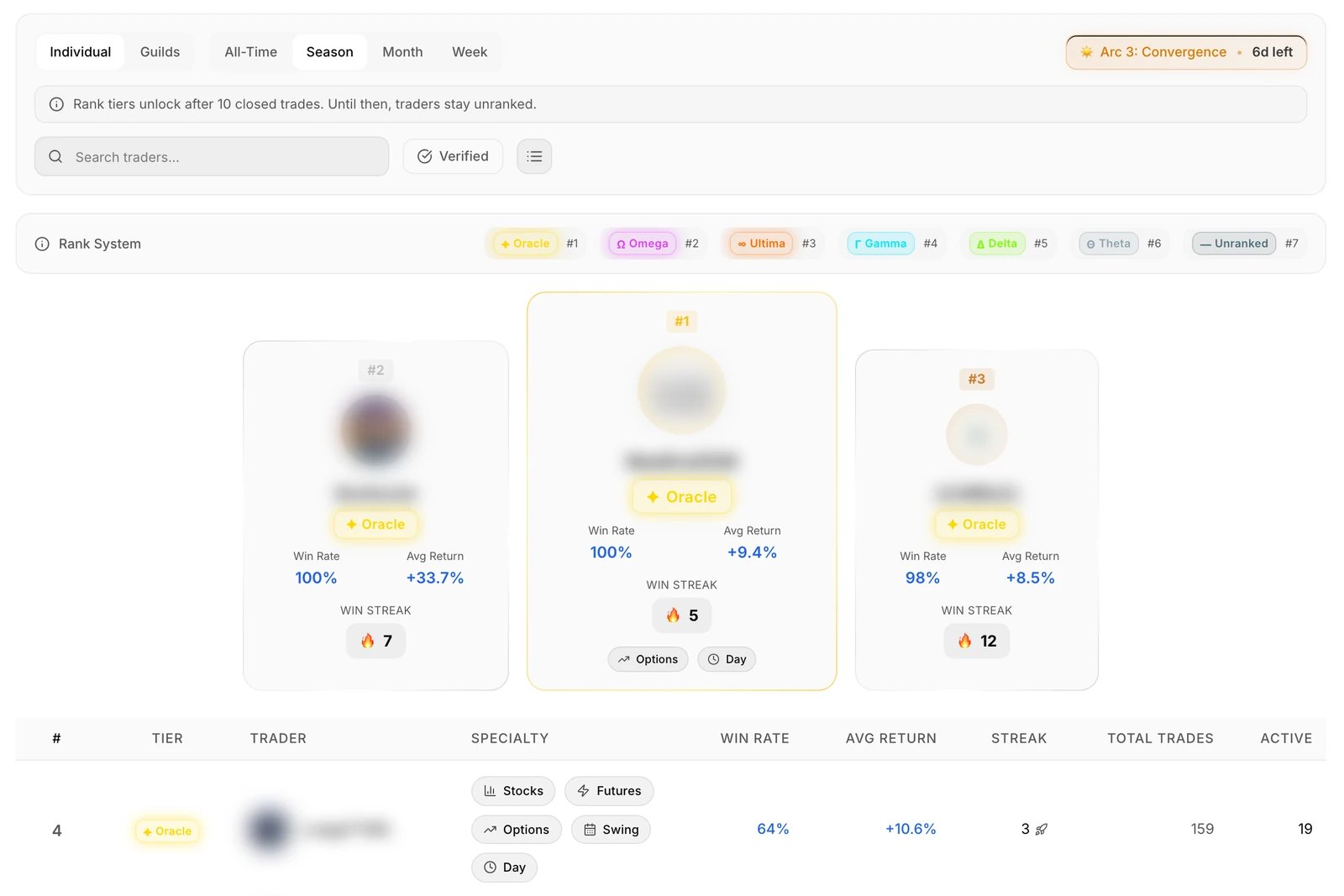
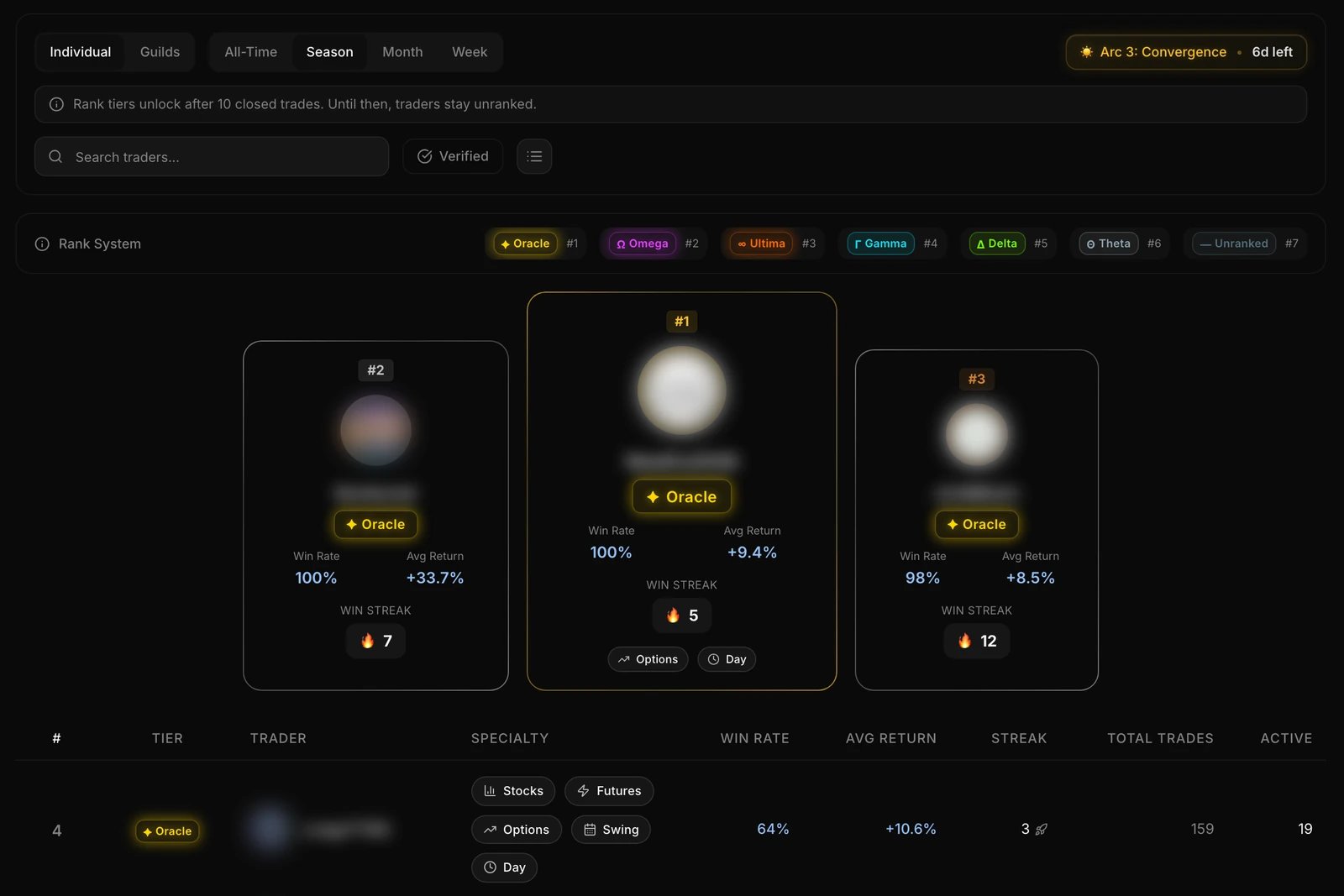 **Following a trader.** Hover a trader's name for a quick card, or click the row to open their profile card (**View Full Profile** opens the whole page). Then click **Follow** (click again to unfollow). Their trades show up under Trades > **Following**, and their ideas under Ideas > **Following**.
**Reading the board.** The columns are #, Tier, Trader, Specialty (Options / Stocks / Futures, Day / Swing), Win Rate, Avg Return, Streak, Total Trades and Active. Only traders with 10 or more closed trades in the timeframe get a number in the # column (the rest show a dash), and the number follows the column you sorted by. In Week or Month view, a win rate of zero next to a flat average return usually means the trader closed nothing in that timeframe, not that every trade lost. Total Trades is not limited to the timeframe, so check it before reading much into a row.
Rank tiers, top to bottom: **Oracle, Omega, Ultima, Gamma, Delta, Theta**, then **Unranked** for anyone under 10 closed trades.
**Arcs** are seasons, one calendar quarter each (Eastern time): Arc 1 *Genesis* (Jan-Mar), Arc 2 *Ascension* (Apr-Jun), Arc 3 *Convergence* (Jul-Sep), Arc 4 *Apex* (Oct-Dec). When an Arc ends, its final standings are saved as the season record. Your wallet carries straight on.
**Following a trader.** Hover a trader's name for a quick card, or click the row to open their profile card (**View Full Profile** opens the whole page). Then click **Follow** (click again to unfollow). Their trades show up under Trades > **Following**, and their ideas under Ideas > **Following**.
**Reading the board.** The columns are #, Tier, Trader, Specialty (Options / Stocks / Futures, Day / Swing), Win Rate, Avg Return, Streak, Total Trades and Active. Only traders with 10 or more closed trades in the timeframe get a number in the # column (the rest show a dash), and the number follows the column you sorted by. In Week or Month view, a win rate of zero next to a flat average return usually means the trader closed nothing in that timeframe, not that every trade lost. Total Trades is not limited to the timeframe, so check it before reading much into a row.
Rank tiers, top to bottom: **Oracle, Omega, Ultima, Gamma, Delta, Theta**, then **Unranked** for anyone under 10 closed trades.
**Arcs** are seasons, one calendar quarter each (Eastern time): Arc 1 *Genesis* (Jan-Mar), Arc 2 *Ascension* (Apr-Jun), Arc 3 *Convergence* (Jul-Sep), Arc 4 *Apex* (Oct-Dec). When an Arc ends, its final standings are saved as the season record. Your wallet carries straight on.
Share a view: Ideas
**Why it matters:** writing your view down before the move keeps you honest, and the feed shows how each idea has played out since.
**Where:** Nexus > **Ideas**.
1. Pick a feed: **Latest**, **Trending** or **Following**.
2. Filter by **Bullish** or **Bearish**, and sort by Newest, Oldest or Biggest Move. Search covers ideas, tickers and users.
3. To post, click **Share Idea** at the top of the page. Enter a ticker, pick bullish or bearish, and write your thesis. You can use `@mentions` and `$cashtags`, and add images and links.
Each idea shows the **price when posted** next to the **current price**. Ideas are separate from trades: they don't count toward your win rate or P\&L.
Post to Discord: Settings
**Why it matters:** your trades and ideas can post to your community's Discord channels without copy and paste.
**Where:** Nexus > **Settings**. The tabs are **Discord**, **Routing**, **Notifications** and **Integrations**.
1. On **Discord**, check your servers and their setup status, and set your **primary guild**: the server your trades go to when you post from Skylit. **Mute All Discord Routing** turns all posting off at once. If Nexus confirms you own or run a server, you can also pick its guild roster here (up to five members for the season).
2. On **Routing**, add rules that decide which trades and ideas post to which channels. Rules can match on content type, call/put or bullish/bearish, options or stocks, simulated or verified, tickers, P\&L, rank and time window.
3. Place a trade. If no channel received it, Nexus tells you.
**Notifications** and **Integrations** say "coming soon". Broker, SMS and social connections are not available yet.
Use it with other Skylit tools
| Tool | How it works with Nexus |
| --------------- | -------------------------------------------------------------------------------------------------------------------------------------------------------------------------------------------------------------------------------------------------------------------------------------------------------------------- |
| **Atlas** | Turn on **Trade Deck** to see your Nexus positions pinned to the chart where you opened them. You can also trade your own positions from there with one tap. Its settings switch between your positions (**Mine**), the traders you follow (**Following**), or **Both**. Hover a position to see its adds and trims. |
| **Heatseeker** | Plan a trade off Heatseeker levels, then log it in Nexus. Your trade cards and profile stats show how those trades went *for you*. |
| **Live Stages** | Hover a username in a Stage to see that person's Nexus card. |
| **Discord** | Routing rules post your trades and ideas to the channels you choose. |
Ask Talon
Talon **can't read your Nexus data yet**: not your trades, wallet or leaderboard position. It does know which Nexus page you are on. It can help with general "how do I" questions, but its Nexus answers are still thin. For your own numbers, use My Profile and your trade cards.
Good to know
* **Every trade is a paper trade.** Connecting a broker isn't available yet, so the **Verified** badge, filter and leaderboard switch stay empty for now.
* **"Season Equity" and "Season Return" cover your whole wallet history**, not just the current Arc. Read them as all-time numbers.
* **The profile Share icon doesn't work yet.** Share your `/nexus/u/` address instead.
* **Leave fills on the market price.** When you add, trim or close, tapping Bid, Mark or Ask switches to a manual price. Orders at a manual price are turned down.
* **Expired options don't show under Closed.** On Trades, the **Closed** filter leaves out contracts that expired while open (the Auto-Expired ones). Set the status filter to **All Statuses** to see them. The **Closed** tab on My Profile does include them.
* **Rank tiers need 10 closed trades.** Until then you show as Unranked.
* **A dash is not a zero.** On your profile, a dash means nothing has been measured yet.
* **A zero row on the leaderboard may be an empty one.** In Week or Month view, a trader who closed nothing in that timeframe shows a zero win rate and a flat average return.
* **Small samples are hints.** Stats from a handful of trades say little. The same goes for other traders: check how many trades they have closed before you read much into a high win rate.
* **Nexus records how you traded.** It is not a forecast, a signal or a recommendation, and it is not for copying other traders.
What's new
**September 2026**
* **Clearer buttons and clickable strikes.** Buttons now shade when you hover, so you see what's clickable, and you can click options-chain strikes with a mouse in narrow windows. See [Place a paper trade: New Trade](#place-a-paper-trade-new-trade).
* **Leaderboard says when rank tiers start.** The Leaderboard now shows the same 10-closed-trade bar for a rank tier that your rank uses, so you know exactly when you'll leave Unranked. See [Rankings: Leaderboard](#rankings-leaderboard).
* **Your likes stick.** Something you liked now shows as liked by you, and a slow connection no longer undoes your like. See [Manage your trades: Trades](#manage-your-trades-trades).
* **A refused trade tells you why.** If Nexus can't place your trade, the ticket now tells you why instead of doing nothing, so you know what to change. See [Place a paper trade: New Trade](#place-a-paper-trade-new-trade).
* **Profile stats show only what was measured.** Your radar shows a dash, not zero, for unmeasured stats, Worst Loss replaces Max DD, trades count once, and Leaderboard popups show the correct followers. See [Your profile and wallet: My Profile](#your-profile-and-wallet-my-profile).
* **Expiration dates you can rely on.** Expirations now show the year when it isn't this one, and the order ticket no longer shows your expiration a day early. See [Place a paper trade: New Trade](#place-a-paper-trade-new-trade).
* **Options chain opens at the current price.** The chain now centres on the stock's price, you choose strike order, and a futures chart opens the matching ETF's options. See [Place a paper trade: New Trade](#place-a-paper-trade-new-trade).
* **Live quotes recover on their own.** If your live price, trades or options chain stream drops, Nexus now reconnects by itself, so you no longer need to reload the page. See [Place a paper trade: New Trade](#place-a-paper-trade-new-trade).
Glossary
Terms as they appear in Nexus. Where the app has its own wording, it is quoted.
| Term | Meaning |
| ----------------------------- | --------------------------------------------------------------------------------------------------------------------------------------------------------------------------------------------------------------------------------------------- |
| **Absolute Apex** | The best return the contract reached, during the trade or after you exited. |
| **Apex Giveback** | How much of the in-trade peak you gave back before closing. |
| **Apex Return** | The best return an open trade has reached so far. |
| **Arc** | A Nexus season, one calendar quarter long: Genesis, Ascension, Convergence, Apex. Arcs change the leaderboard only. |
| **Auto-Expired** | A contract still open at expiration, closed automatically. |
| **Cred** | Your Nexus reputation score, shown on your profile. |
| **Guild** | A Discord server as a team on the leaderboard. Its row reflects the season roster its owner picks (up to five members), or its members when it has no roster. Your primary guild, set in Settings > Discord, is where your trades are posted. |
| **Max Drawdown** (trade card) | The worst point a single trade reached. |
| **Missed Upside** | The gap between the best return the contract reached, during or after the trade, and where you closed. |
| **Rank tier** | Oracle, Omega, Ultima, Gamma, Delta, Theta. Earned after 10 closed trades; Unranked until then. |
| **Simulated** | A paper trade in your Nexus wallet. |
| **Snapshot** | The ticket's quote is not streaming, or is too old to count as live. |
| **Verified** | A trade confirmed through a connected broker. Not available yet (see Good to know). |
| **Wallet** | Your practice cash account, starting at \$100,000. There is one per member and it is permanent: seasons never reset it. |
| **Worst Loss** | Your single worst closing return on the profile radar. Not an account drawdown. |